The security scanner caught 3 issues in 30 seconds. A human auditor would have missed all of them.
That was the moment I knew this thing needed to be open source.
The Invisible Problem
Six months ago, I gave an AI agent access to my email, calendar, and database. It was helpful. It scheduled meetings, drafted responses, remembered context across conversations better than I did.
Then I realized I had no idea what it was actually doing.
How many API calls had it made this week? What was my token spend trending toward? When it "learned" something from our conversations, where did that information go? When it sent an email on my behalf, was there a record anywhere?
The answer to all of these: I had no clue.
We Built Observability for Servers. Not for Agents.
We've spent decades building observability into infrastructure. Logs. Metrics. Traces. Dashboards showing request latency, error rates, resource consumption. An entire industry exists because "hoping servers work" is not an operations strategy.
But AI agents? We give them the keys to our digital lives and then hope for the best.
I was doing exactly that. And I build AI tools for a living.
If I was flying blind, how many others are too? Based on conversations in AI communities, the answer is almost everyone.
What OpenClaw Dashboard Actually Does
A few weeks ago I shared how my AI agent built 20 self-improvement tools in a single session. A learning database. Error logger. Skill tracker. The works.
That experiment became the foundation for something bigger. I took those tools, expanded them, wrapped them in a proper interface, and built the control room I wished existed from day one.
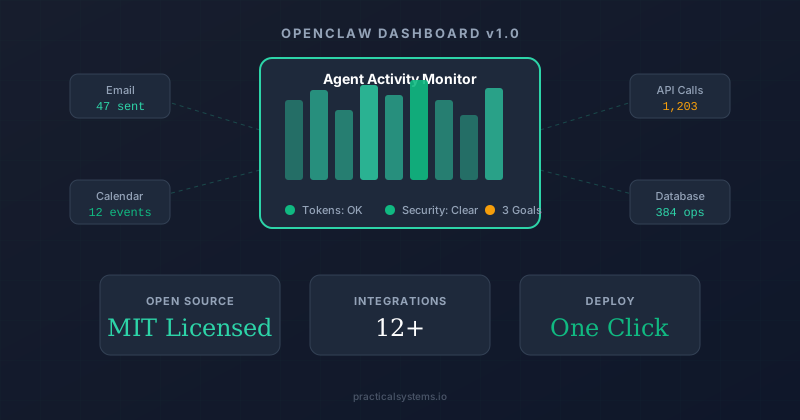
OpenClaw Dashboard is an open source command center for AI agents. Think of it as the observability layer that's missing from the AI agent ecosystem right now.
Here's what it tracks:
Token Budget Monitoring. See your context window usage, hourly and weekly budgets, and estimated costs before you get a surprise bill. The dashboard shows when you're approaching limits so you can adjust behavior proactively instead of reactively.
Learning Database. Track decisions and their outcomes over time. When your agent makes a call, log it. When you see the result, record whether it worked. Over time, you build a dataset of what strategies actually perform and which ones just felt right in the moment.
Relationship Context. A lightweight CRM showing who your agent has interacted with, conversation snippets, and follow up dates. Essential when your agent is managing communications across dozens of contacts and you need to know what was said to whom.
Security Audit Logs. Every external action gets logged. Email sent, API called, file created. When something goes wrong (and it will), you have a trail instead of a mystery.
Goal Tracking. Progress toward objectives with milestones, deadlines, and status updates. The agent tracks its own performance against targets you set.
Integrations Hub. Connect Neon, Notion, GitHub, OpenAI, Anthropic, Brave Search, ElevenLabs, Telegram, Google Workspace, Vercel, and more. All configured from the UI with encrypted credential storage.
The Security Angle That Changes Everything
Building this dashboard forced a confrontation with something uncomfortable. The gap between "answers questions" and "takes actions" is enormous. Once your AI crosses from assistant to agent, from responding to acting, the monitoring requirements change completely.
The dashboard includes a full security toolkit:
Security Scanner. Run node scripts/security-scan.js and it finds hardcoded secrets, checks .gitignore coverage, and runs npm audit. It caught issues in my own code that I had missed for weeks. Three vulnerabilities in thirty seconds. No human review required.
Audit Template. A comprehensive methodology for reviewing agent codebases before they touch production. Not a checklist you skim. A structured process you follow.
Deployment Checklist. The pre-launch security review you're probably skipping. Credential rotation tracking included, because "when did I last rotate that API key?" should not require archaeology.
Why Open Source
I could have kept this internal. It powers how I run my own agent. Sharing it means competitors can see exactly how we operate at Practical Systems.
But that is precisely the point.
We've built our entire company on the principle that we run what we sell. Every blog post on our site was processed by our own agents. Every prospect in our CRM was scored by our own system. This dashboard is the latest expression of that philosophy.
More importantly, the AI agent ecosystem has an observability gap that's getting dangerous. People are giving autonomous systems access to email, calendars, databases, and financial accounts with zero visibility into what those systems are doing. That is not a competitive advantage to protect. That is a community problem to solve.
The dashboard is MIT licensed. Free forever. Deploy it on Vercel with one click or download the ZIP and run the installer script locally.
Getting Started
Three options depending on your comfort level:
One click deploy. Hit the Vercel button on the repo and paste your Neon database URL. You'll be up in under five minutes.
Local install. Download the ZIP, run the installer script for Mac or Windows, follow the prompts. No coding required. The Quick Start Guide walks through everything.
Clone and customize. Fork the repo and make it your own. It's Next.js 15 with Tailwind and Recharts. If you've built with React before, you'll feel right at home.
The /setup page provides a guided walkthrough once deployed. Configure your integrations, connect your database, and start seeing what your agent is actually doing.
What Comes Next
This is version 1.0. The foundation. The roadmap includes real time WebSocket updates, multi-agent monitoring for people running more than one agent, anomaly detection that alerts you when your agent's behavior deviates from established patterns, and a plugin system for custom monitoring modules.
But the version that's live today already solves the core problem. You can see what your agent is doing. You can verify what it claims. You can audit what it's done. And you can catch security issues before they become incidents.
That's not optional anymore. That's table stakes for anyone running an AI agent in 2026.
GitHub: github.com/ucsandman/OpenClaw-Dashboard
If you're running an AI agent with access to your email, calendar, or any external API, you need visibility into what it's doing. This is how you get it.
What's the first thing you'd want to monitor about your AI agent?